Checkbook - Account Tracker
TinyWork AppsFinance
3.64.29K Reviews
- Version
- 2.1.2
- Installs
- 100.00K
- Age Rating
- Everyone
Screenshots
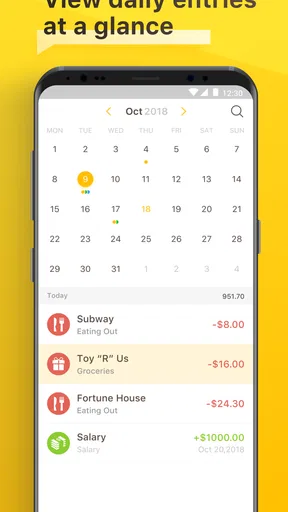
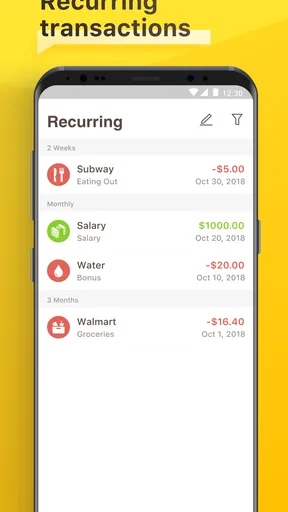
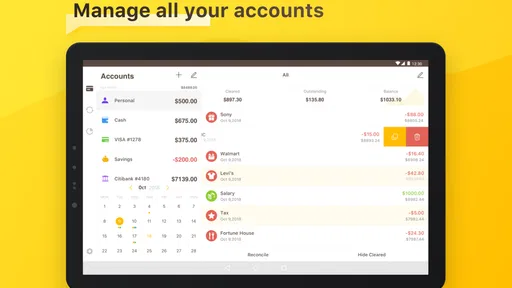
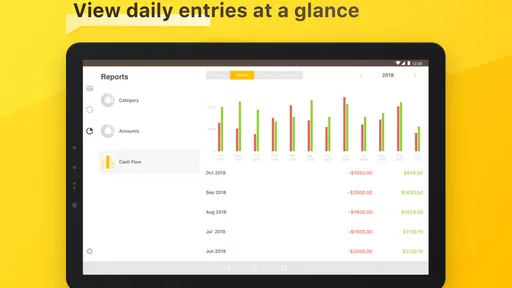
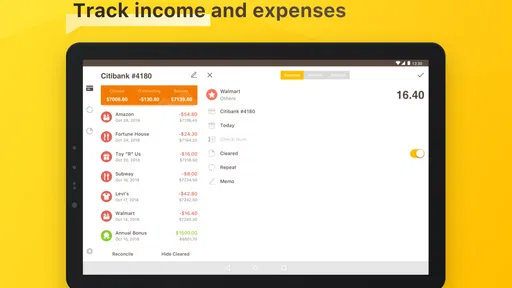
Our Review of Checkbook - Account Tracker
 Analysis by Appyee
I like finance apps that understand their job and stay out of the way. Checkbook - Account Tracker takes that approach: it is a digital replacement for a handwritten checkbook register, built for recording money coming in and going out rather than trying to become a complete banking platform. After using it as a simple account ledger, I found its main appeal easy to understand. It gives you a place to enter transactions, keep a running balance, and check your spending without carrying a paper notebook.
That narrow focus is both its strength and its limitation. If you want a lightweight way to track one or more everyday accounts manually, this finance app can feel refreshingly direct. If you expect automatic bank connections, investment tools, bill negotiation, or elaborate budgeting dashboards, you will probably find it too basic. My recommendation depends almost entirely on whether you prefer deliberate manual tracking over automation.
How the everyday checkbook workflow feels
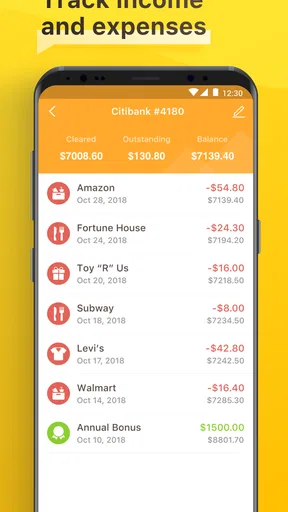
The basic routine is straightforward. I open the app, choose the account I am working with, and record a transaction when money moves. A purchase can be entered soon after paying, while income can be added when it arrives. The important habit is not entering every detail perfectly; it is making the register reflect the real balance often enough that the number remains useful.
This makes the app especially practical for people who still reconcile their spending manually. For example, imagine buying groceries, paying a utility bill, and receiving a salary payment in the same week. Rather than waiting for a bank statement and trying to remember what happened, I can add each item as it occurs. The running balance then becomes a quick reference before I decide whether another purchase fits comfortably.
That workflow is different from checking a banking app. A bank application shows what has already cleared or is pending at the institution. A checkbook register is more personal: it can represent the balance I believe I have after accounting for payments I have made, even when those transactions have not fully appeared in the bank feed. That distinction is useful, but it requires discipline. The app cannot correct an entry I forget to make.
I would begin with one account and use it consistently for several days before creating a complicated system. Enter the opening balance carefully, record transactions at the same point in your routine, and compare the app with your bank account periodically. If the numbers disagree, correcting the earliest missing or mistyped transaction is usually easier than making a random balance adjustment and losing track of the reason.
The most important feature is the habit of recording transactions before memory turns them into guesses. This sounds obvious, but it is where a manual tracker succeeds or fails. I found it more useful to make a quick entry immediately after a purchase than to promise myself I would reconstruct the week later.
Who benefits from manual tracking
This app suits someone who wants awareness without handing account access to a third-party service. It can also work well for a student, freelancer, or household member who needs to monitor a personal spending account separately from a larger family budget. Because the process is manual, it encourages me to notice each transaction instead of treating money as an invisible stream of card notifications.
It is also a reasonable choice for people who use cash, checks, transfers, or mixed payment methods. Automatic bank tools can be convenient, but they may not represent cash spending until the user enters it. A register-style app keeps the responsibility in the user’s hands, which is helpful when the goal is learning where money actually goes.
On the other hand, I would not choose it as the only financial tool for someone managing investments, several credit cards, shared accounts, or a detailed household budget. Manual entry becomes tiring as the number of accounts grows. Users who want automatic categorization, synchronized balances, reports across institutions, or a complete financial picture should look toward a more comprehensive money-management service.
Settings and setup decisions worth making early
The best setup is not the one with the most categories or the most elaborate naming scheme. It is the one I can maintain. I would give accounts clear names that match their real purpose, then decide in advance how to label common transactions. Consistency matters more than precision: using the same wording for recurring expenses makes later review much easier than creating a new label every time.
I also recommend checking the app’s available account and transaction settings before entering a long history. Small choices made at the beginning can affect how comfortable the register feels later. Confirm the starting balance, review the date used for the first entry, and make sure the transaction details match the way you personally think about spending. A register is only helpful when its structure reflects your real routine.
The current version is 2.1.2, and the app runs on Android 7.0 or later. That makes it accessible on many older devices, which is useful if you want to keep finance tracking on a spare phone rather than your newest handset. Still, I would test the workflow on the device you plan to use every day before importing or entering a large amount of information.
Another practical setting decision is how much detail to record. For a small personal account, a short description and amount may be enough. For a shared household, adding a consistent note can prevent confusion later. I would avoid writing long explanations for every purchase, because excessive detail makes manual tracking feel like paperwork. Reserve extra notes for transactions that need context, such as reimbursements, transfers, or unusual cash withdrawals.
It is also worth deciding how you will handle pending payments. I prefer entering a payment when I commit to it, not only when it clears, because that gives me a more realistic view of available money. Someone who wants the register to mirror cleared bank activity may prefer a different approach. Neither method is universally correct, but switching between them without a rule will make the balance hard to interpret.
Faster patterns that make manual entry sustainable
The fastest users are not necessarily the people who type the quickest. They are the people who reduce repeated decisions. I would create a simple routine around predictable expenses: enter rent, subscriptions, or regular transfers in the same way each time, then review the entry before saving. If the app offers repeatable entry tools in the version installed on your device, they are worth checking, but I would not build a workflow around options I cannot see in my own installation.
A useful pattern is a two-pass review. The first pass records the transaction with enough information to protect the balance. The second pass, perhaps during a weekly check, corrects descriptions or adds context. This prevents the common mistake of delaying every entry because there is no time to make it perfect. A timely, simple record is more valuable than a detailed record that never gets entered.
I also found it helpful to separate “recording” from “reviewing.” Recording answers, “What happened?” Reviewing answers, “What does this mean for the rest of the month?” Mixing those tasks after every purchase can make the app feel judgmental or slow. I can enter a coffee purchase quickly, then look at the broader pattern later when I have enough transactions to make a useful decision.
For people who share financial responsibilities, agree on a naming convention before both users start entering information. Even if only one person uses the app, a consistent format for transfers and reimbursements prevents a false impression of income or spending. A transfer between your own accounts should not be treated mentally like new money, and a reimbursement should be distinguishable from ordinary earnings.
One non-obvious advantage of a manual register is that it can serve as a short-term spending brake. When I know I must enter a purchase myself, I pause for a moment and recognize the transaction. That extra friction is not ideal for everyone, but it can help someone who wants more awareness rather than a completely effortless record. In this case, the app’s lack of automation is part of the behavioral value.
Where the simple approach reaches its limits
The central trade-off is clear: control and privacy of process come at the cost of convenience. The app does not replace the need to reconcile with your bank, remember cash purchases, or correct mistakes. A running balance can look convincing even when it is wrong, so I would never treat it as an unquestionable financial authority.
Manual tracking also becomes less attractive when transactions multiply. A person with one main account may find the routine manageable, while someone with several cards and frequent transfers may spend more time maintaining the register than learning from it. At that point, automatic aggregation or a dedicated budgeting system may be the better choice, even if those tools require more setup and may introduce their own privacy or categorization concerns.
The app’s average rating is 3.6 from around 9 thousand ratings, with more than 4 thousand written reviews. I read that as a sign of a practical but not universally satisfying tool: enough people find the basic idea useful, while others likely want a smoother or more modern financial experience. Its install count is over 100 thousand, so it has reached a meaningful audience without making scale itself a reason to trust it blindly.
There is also a financial consideration. The app is free to install, but it includes in-app purchases ranging from $0.99 to $19.99 per item. I would check what an optional purchase unlocks before paying, especially if my needs are limited to a basic register. The free starting point makes it easy to test whether manual entry fits my habits, and that trial is more important than any feature list.
Its Everyone content rating makes the app approachable for a broad audience, but suitability is still about financial needs rather than age alone. A young user learning to manage allowance or part-time income may appreciate the register concept. An experienced user managing taxes, investments, or business cash flow will probably need additional tools and should not mistake a checkbook replacement for accounting software.
How it compares with the usual alternatives
Compared with a paper register, this app is easier to carry and less likely to be misplaced, while still preserving the intentional act of entering each transaction. Paper can be faster for someone who writes quickly and wants a completely offline-feeling process, but digital records are easier to correct and review. The choice comes down to whether you prefer handwriting or a searchable, device-based ledger.
Compared with a banking app, this tracker gives me more control over what I consider available money. A bank app is better for confirmed balances, alerts, transfers, and institution-specific actions. This app is better as a personal record that can include my own interpretation of pending payments. I would use both rather than treating them as competitors: the bank verifies reality, while the register helps me plan around it.
Compared with a full budgeting application, Checkbook - Account Tracker is less demanding and less informative. It does not need a large planning system to be useful, but that simplicity means it will not answer every question about monthly categories or long-term goals. Someone who wants a quick account ledger should appreciate the smaller scope; someone who wants charts, forecasts, and automatic organization should choose a broader finance product.
Compared with a spreadsheet, the app is more focused and likely easier to use for repeated entries, while a spreadsheet offers greater freedom for formulas and custom reports. I would pick the app when I want a ready-made register and a spreadsheet when I need unusual calculations or a tailored financial model. The app’s value is not unlimited flexibility; it is reducing the work required to maintain a familiar checkbook-style record.
My verdict after settling into the routine
Checkbook - Account Tracker is a focused finance app for people who want to track accounts manually and understand their balance through regular entries. TinyWork Apps has kept the concept narrow, and I think that is the right way to judge it. It is not trying to replace every financial service. It is trying to make the old checkbook register practical on a phone.
I would recommend it to someone who wants a free starting point, prefers not to depend on automatic bank syncing, and is willing to build a small daily or weekly habit. I would skip it if I needed a complete financial dashboard, automatic transaction imports, investment monitoring, or effortless multi-account management. In those cases, the manual register would become a chore rather than a benefit.
My best advice is to test it with one real account, a carefully entered opening balance, and a simple recording rule. Use it for long enough to see whether entering transactions changes your awareness of spending. If the routine feels natural, the app can remain a useful low-friction ledger. If you repeatedly forget entries or need information it was not designed to organize, that is a clear signal to move to a more capable alternative.
For the right user, its modest scope is reassuring. I do not need a complicated financial system to answer a basic question such as, “What money is realistically available after the payments I have already made?” This app gives me a practical way to keep that answer visible, provided I do my part and keep the register honest.
Verdict
Strengths of Checkbook - Account Tracker
- Simple interface makes recording income and expenses quick.
- Supports multiple accounts for better personal finance organization.
- Recurring transactions reduce the effort of entering regular payments.
- Search and filtering help locate older transactions easily.
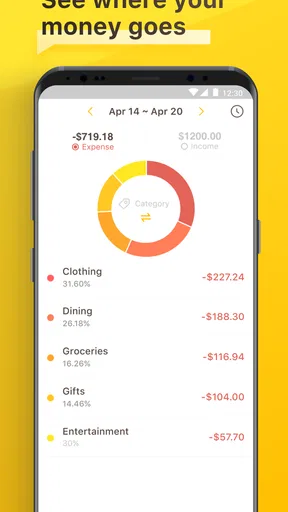
- Useful reports provide a clearer view of spending patterns.
Limitations of Checkbook - Account Tracker
- Some advanced features may require an in-app purchase.
- Manual entry can become time-consuming for frequent transactions.
- Limited automation compared with apps that sync directly with banks.
- The interface may feel dated on newer phones.
- No budgeting guidance may be available for users needing financial advice.
Other Releases by TinyWork Apps
View All
Tiny Scanner - PDF Scanner App
Business4.6

Tiny Fax - Send Fax from Phone
Business4.6

Invoice Maker - Tiny Invoice
Business4.4
Similar Picks in This Category
View All
Google Wallet
Google LLC4.3

Airtel: Recharge, Bank & Loans
Airtel4.0

PayPal - Pay, Send, Save
PayPal Mobile4.2

DANA Indonesia Digital Wallet
PT Espay Debit Indonesia Koe4.5

Binance: Buy Bitcoin & Crypto
Binance Inc.4.8

Cash App
Block, Inc.4.7
Frequently Asked Questions
What is Checkbook - Account Tracker used for?
Checkbook - Account Tracker is a personal finance app designed to help you record income, expenses, transfers, and account balances in one place. It can be useful for managing checking accounts, savings accounts, cash, credit cards, or other personal funds. By entering transactions as they happen, you can keep a clearer view of where your money goes and compare your records with your bank statements.
Does Checkbook - Account Tracker connect directly to my bank account?
The app is primarily intended for manual transaction tracking, so users should not assume that it automatically connects to every bank or downloads transactions in real time. This can be an advantage for people who prefer more control and privacy, but it also means that accurate results depend on regularly entering transactions yourself. Before downloading, check the current app description for supported synchronization or import features.
Can I use Checkbook - Account Tracker for multiple accounts?
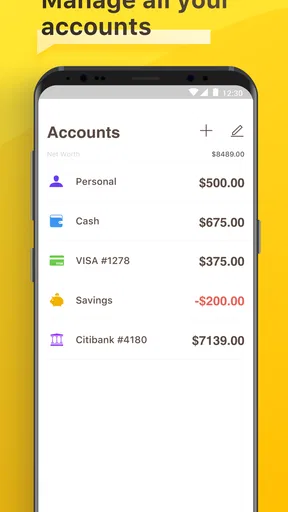
Yes, the app is designed to organize more than one financial account, allowing you to keep separate records for checking, savings, cash, credit cards, or other balances. This makes it easier to monitor money across different places without mixing transactions together. The exact number of accounts, categories, and advanced management options may depend on the version and platform you install.
Is Checkbook - Account Tracker suitable for budgeting?
Checkbook - Account Tracker can support basic budgeting by showing your recorded income, spending, and account activity, but it is best understood as a checkbook and transaction-management tool rather than a complete financial-planning service. It may help you identify spending patterns and maintain a running balance. Users seeking detailed forecasts, investment tracking, or automatic bank-based budgets should review the available features carefully.
Is my financial information safe in Checkbook - Account Tracker?
Because you may enter sensitive information such as balances, payees, and spending details, you should review the app’s privacy policy and security settings before using it. Avoid entering unnecessary banking credentials or confidential account numbers unless the official app documentation clearly explains how they are protected. Also check whether the app offers passcode, biometric protection, backup, or export options on your device.
